Image Processing
The Image Processing module is designed specifically for industrial image preprocessing and dataset restructuring. It supports synchronized transformations of images and JSON labels, ensuring data consistency.
1. Format Conversion
Description:
Supports conversion between the BMP and PNG formats commonly used by industrial cameras.
- Core features:
- Synchronized name update: After converting the format, the system automatically modifies the corresponding image file name in the JSON, ensuring that the internal
imagePathfield exactly matches the file name on disk. - Error prevention: Effectively solves the problem of "images cannot be matched with their JSON files" caused by manually renaming files.
- Synchronized name update: After converting the format, the system automatically modifies the corresponding image file name in the JSON, ensuring that the internal
2. Image Splitting
Description: For ultra-high-resolution images (such as those captured by line-scan cameras), it supports splitting them into multiple smaller images.
- Key points:
- Synchronized processing: When an image is split, the system automatically recalculates and cuts all the marked boxes inside the JSON.
- Flexible configuration: Custom row and column counts for the split are supported.
3. Pixel Resizing
Description: Batch-resizes images to speed up model training.
- Smart alignment: In order to fit the BackBone input of deep learning models such as YOLO, the system automatically aligns the custom size to a multiple of 32.
- Recalculation: After resizing, all the coordinate points inside the JSON are automatically shifted and scaled proportionally.
Dataset Backup Recommendation
Although reducing the image size can significantly cut the training time, always keep the original large images when archiving and backing up, so that the algorithm can be optimized later.
4. Auto-Contour Crop
Description: For industrial scenes with a fixed background, it automatically identifies the contour of the material and performs a contour-hugging crop.
- Padding factor: The user can define the reserved distance (Padding) between the edge of the material and the image boundary, preventing the crop from being too tight and causing edge information to be lost.
- Use cases: Removes background noise so that the model can focus on the defects of the material itself.
5. Dataset Cropping
Description: Used to remove irrelevant interfering regions from the frame and keep only a specific ROI (region of interest).
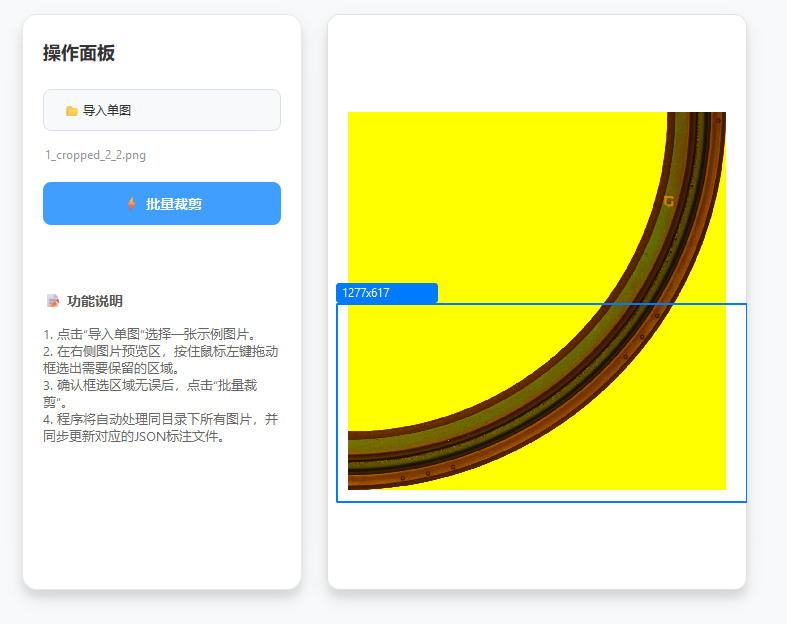
How to use:
-
Click [Import Single Image].
-
Draw a rectangle with the mouse in the preview window (the area inside the rectangle is the region to keep).
-
After confirming what to keep, click [Batch Crop].
Typical Scenario
When certain defects appear only at specific positions of the product (such as the center or the edge), this feature can effectively remove surrounding interference and improve model accuracy.
6. Metadata Cleaner
Description: Deep-cleans the redundant metadata inside JSON files.
- Main cleanup targets:
imageData: The Base64 raw data generated by Labelme (this data makes the JSON file extremely large and severely consumes memory).flags: Useless flag groups.- Other custom metadata.
Advice from the Developer
If you are still using Labelme for annotation, it is recommended that you migrate to ATSVisionOps as soon as possible, for a lighter and more efficient annotation experience.