5. Object Detection Data Augmentation
Description
A data augmentation tool for object detection tasks. It processes images together with their corresponding YOLO labels (.txt) at the same time, and automatically updates the bounding box coordinates when spatial transformations (mirroring, rotation) are applied, so there is no need to re-annotate manually.
With this tool, you can quickly expand the size and complexity of the training dataset when the sample count is insufficient or the diversity is lacking, thereby improving the generalization ability of the model.
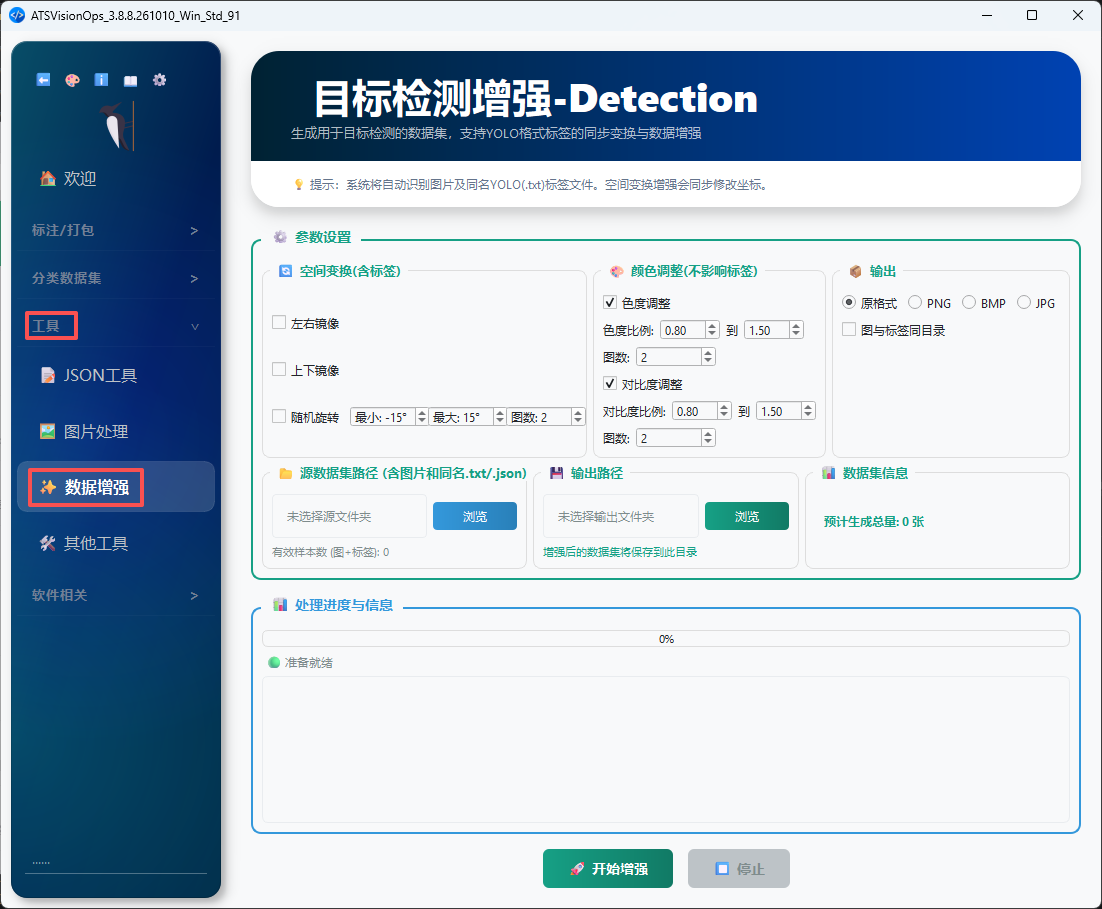
1. Feature Overview
The tool interface is divided into the following sections from top to bottom:
- Header section: Displays the feature name and a one-line description.
- Parameter settings section:
- 🔄 Spatial transformations (with labels): left-right mirroring, top-bottom mirroring, random rotation.
- 🎨 Color adjustments (no impact on labels): hue adjustment, contrast adjustment.
- 📦 Output: original format / YOLO format, images and labels in the same directory vs. separate directories.
- Source dataset path: Select the folder containing the images and the
.txtfiles with the same names (YOLO labels). - Output path: Select the location where the augmented dataset will be saved.
- Progress and information section: Displays the estimated total number of images to be generated, the current status, and the progress bar.
- Action buttons:
🚀 Start Augmentation/⏹️ Stop.
💡 Tip: The system automatically recognizes the images and the YOLO label (
.txt) files with the same names. Spatial transformation augmentations update the coordinates in sync.
2. Spatial Transformations (with Labels)
Spatial transformations modify both the images and the label box coordinates, so you can enable them with confidence:
| Option | Description | Impact on Labels |
|---|---|---|
| Left-Right Mirroring | Flips the image left to right along the Y axis as the centerline | x_center of the YOLO box becomes 1 - x_center |
| Top-Bottom Mirroring | Flips the image top to bottom along the X axis as the centerline | y_center of the YOLO box becomes 1 - y_center |
| Random Rotation | Rotates the image randomly within the specified angle range | (x_center, y_center) is recalculated according to the rotation angle |
Each transformation comes with an "Image Count" field, indicating how many additional images are generated under that transformation.
3. Color Adjustments (No Impact on Labels)
Color adjustments only affect pixel values and do not change any coordinates in the labels, so you can safely stack them:
- Hue adjustment: Randomly changes the H channel of HSV within the
[from, to]range, simulating changes in the color temperature of the lighting. - Contrast adjustment: Randomly changes the image contrast within the
[from, to]range, simulating different exposure conditions.
4. Output Format
The tool provides two output modes:
- Original format: Keeps the same directory structure as the source directory, with an augmentation index suffix added to the file names.
- YOLO format: Outputs a unified two-directory structure of
images/+labels/, making it easy to plug directly into a YOLO training script.
Optional setting "Images and Labels in the Same Directory":
- Checked: Images and labels are saved in the same folder.
- Unchecked: They are saved separately in the two subfolders
imagesandlabels.
5. Usage Workflow
- Select the source dataset path: Choose the folder containing the original images and the
.txtlabels with the same names; the tool automatically counts the number of valid samples (image + label pairs). - Select the output path: Choose the location where the augmented dataset will be saved.
- Configure the augmentation operators: Check the required spatial transformations and color adjustments, and set the image count and range for each operator.
- Confirm the estimated total: The middle of the interface displays "Estimated Total" for reference.
- Click
🚀 Start Augmentation: The progress bar updates in real time, and you can click⏹️ Stopat any time to interrupt. - Wait for completion: When the status changes to 🟢 Ready, the current task is finished.
6. Notes
Requirements for the Source Folder
- An image and the
.txtfile with the same name (the YOLO label) must exist as a pair to be counted as a valid sample. - If multiple
.txtlabels exist for the same image, they are ignored; it is recommended to merge them beforehand.
Output Space
- The output directory must be different from the source directory, to avoid overwriting the original data.
- If a file with the same name already exists in the output directory, an index suffix is automatically appended to the newly generated file, and the existing file will not be overwritten.
Augmentation Strategy Recommendations
- When defect samples are scarce, you can enable Random Rotation + Left-Right / Top-Bottom Mirroring first, because these operators can significantly increase sample diversity.
- For workstations with unstable lighting, appropriately widening the Hue / Contrast range can reduce false detections caused by lighting changes.
7. Relationship with the Legacy Standalone "Data Augmentation" Program
The legacy document Extra Section: Data Augmentation describes a standalone program that is not integrated into the main program. Functionally, it is replaced by this tool:
| Item | Legacy (standalone program) | New version (this tool) |
|---|---|---|
| Integrated into ATSVisionOps | ❌ Runs independently | ✅ Integrated into the "Tools" group of the main program sidebar |
| Label synchronization | Manual handling required | ✅ Automatically synchronized for spatial transformations |
| Output format | Single | Original format / YOLO format selectable |
| Ease of operation | Must be launched separately | Unified entry point shared with the other tools |
Existing users can still refer to the legacy document "Extra Section: Data Augmentation" for the old instructions, but continuing to use it is not recommended.