Data Optimization
This chapter explains how to use the built-in Test tool of ATSVisionOps to optimize a dataset. This feature supports automated renaming, unified defect class names, and mapping modifications, all without damaging the original data.
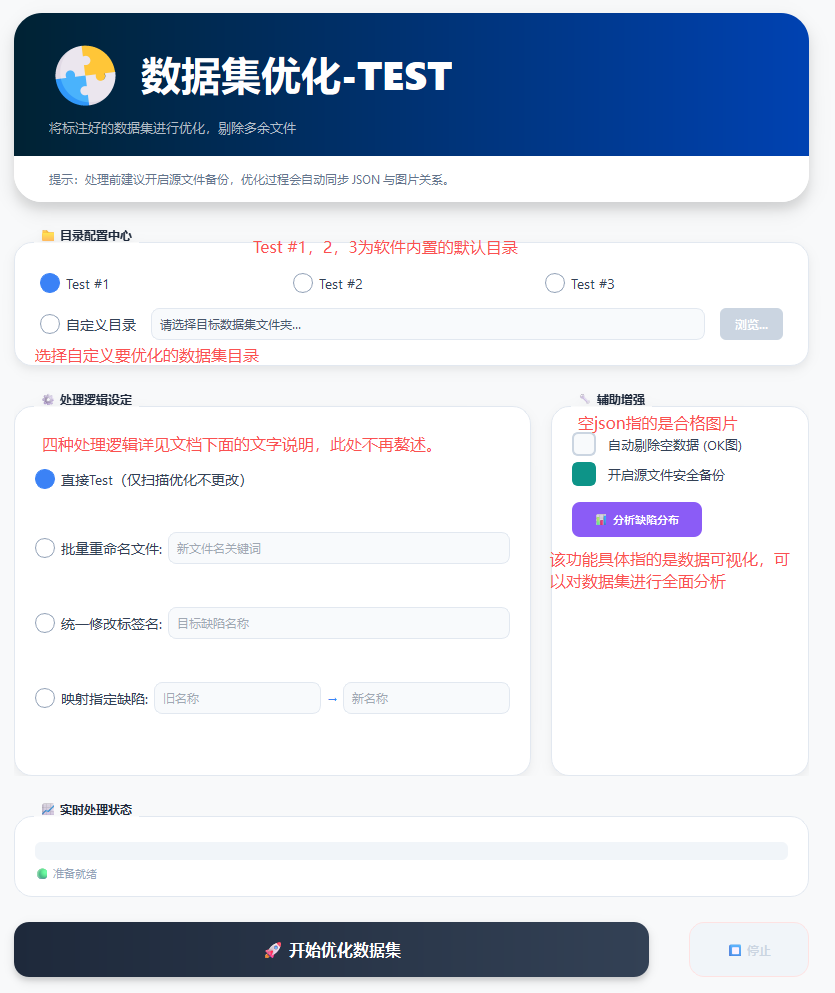 
1. Default Test Logic (Direct Optimization)
If you do not need to make any changes to the current image names or defect names and only want to optimize the dataset, you can use the default operation.
- Steps:
- Confirm that the input path is correct.
- Click the [Start Optimizing Dataset] button directly (no change options are checked by default).
- Result:
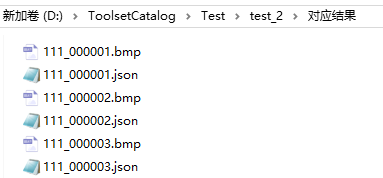
- After "Completed" is displayed, the system generates the image and JSON files in the corresponding
Result Folder. - Data consistency: The images and JSON files correspond one-to-one and can be used directly for subsequent COCO format conversion or model training.
- After "Completed" is displayed, the system generates the image and JSON files in the corresponding
2. Batch Renaming Files
To make data management easier, you can rename the dataset globally, and the system will automatically update the reference fields inside the JSON files in sync.
- Steps:
- Check the "Batch Rename Files" option.
- Enter the target prefix in the input box (e.g.:
111). - Click [Start Optimizing Dataset].
-
Features:
-
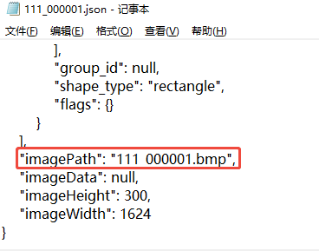
Synchronized modification: It not only changes the file names on the physical disk (such as
111_000001.jpg), but also automatically corrects theimagePathfield inside the JSON file, ensuring that no data associations are lost. -
-
3. Defect Name Management
For cases where label names are non-standard or categories need to be merged, the system provides the following two modes:
A. Unify Defect Names (Global Overwrite)
Applicable when all defects of different categories in the current dataset need to be merged into a single new name.
-
Example: The original label is
qx(defect), and you want to change it uniformly tobd(white spot). -
Effect: After processing, the
labelfield in every JSON file in the result folder will be changed tobd.
B. Map Specific Defects (Precise Replacement)
Applicable when only specific defect categories need to be changed while all other categories are kept unchanged.
-
Example: The dataset contains three labels,
qx,zz, andbd, and onlyzz(impurity) needs to be changed tobszz(white impurity). -
Operation: Check "Map Specific Defects", enter
zzin the old name field andbszzin the new name field. -
Effect: Only
zzis replaced; all other labels remain unaffected.
Data safety: All optimization operations are performed in the "Result Folder" and will not modify your original input data.
